Turn the YouTube lecture you're watching into notes, timestamped chapters, key terms, a full transcript and a quiz — one click, no copying links, no API key. Works on videos that have captions or subtitles.
Download Extension (free)You're on a phone. Chrome extensions only install on desktop Chrome, Edge or Brave. Open this page on a computer to add it — or, on this phone right now, record or upload a lecture instead. That path works everywhere and needs nothing installed.
chrome://extensions and turn on Developer mode (top-right toggle). Then click Load unpacked.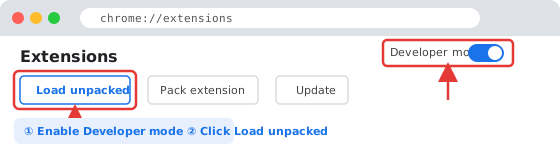

This is the question we get most, and the honest answer is not a design preference. YouTube refuses requests that arrive from datacentre servers. Every tool that runs on rented infrastructure — ours included — sits behind exactly the kind of IP address YouTube declines to serve. So a pasted YouTube link cannot reach the video's audio from our side, no matter how the box on the page is worded.
Plenty of sites promise otherwise. If you have tried one and watched it spin and fail, that is why: we tested it on our own production server and wrote up what came back.
The extension takes the other route. It runs inside the browser session you are already watching in, and it reads the caption track the video already carries — the same request your own player makes when you turn subtitles on. Nothing is downloaded, nothing is re-recorded, and no request is made from our machines to YouTube at all. That is the whole trick, and it is why the extension works where the paste box cannot.
It is also fast. Because the captions are already text, there is no transcription step to wait through: the summary starts generating the moment you click.
Most YouTube summary extensions put a paragraph or a bulleted TL;DR in the sidebar and stop there. That is useful for deciding whether a video is worth watching. It is not much use the night before an exam.
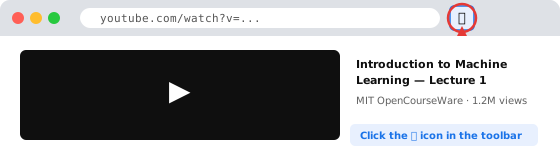
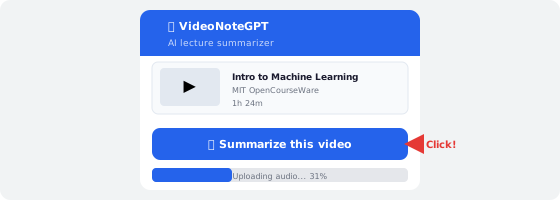
Clicking the icon produces the same full result the website does, opened in its own tab:
.apkg flashcards built from the key terms.The Chrome Web Store has a crowded shelf of YouTube summarizers — Eightify, NoteGPT, BibiGPT, Clarify AI, "YouTube Summary with ChatGPT & Claude" and others. They are good at what they do, and what they do is different from this. Checked August 2026:
| Typical sidebar summarizer | VideoNoteGPT extension | |
|---|---|---|
| Output | TL;DR paragraph or bullets, in the page | Chapters, key points, terms, transcript, quiz, flashcards |
| Where it lands | Beside the video — quick to skim, gone when you close the tab | A saved page you can revisit, share and export |
| Speed to first words | Usually faster — less is being produced | Slower; a full study set takes longer to write |
| Setup | Several want an account, an API key or a linked ChatGPT session | Install and click — no account, no key |
| Revision tools | Rare; a few offer mind maps | Graded quiz and Anki .apkg export |
| Price | Free tier common; the well-known ones charge for volume | Free to start; Pro is $6.99/mo |
Pick the other kind if you mostly want to triage a watch-later list — a sidebar TL;DR is the right tool and it is quicker. Pick this one if the video is coursework and you are going to be tested on it.
An extension that can read a page you are logged into deserves a straight answer about what it touches. This one asks for three permissions and no more:
activeTab — read the video you are on, only at the moment you click the icon.storage — remember your VideoNoteGPT session so the notes land in your library rather than an anonymous one.scripting — run the small script that pulls the caption track out of the page.It runs on youtube.com/watch pages and on videonotegpt.com, and on no other site. It does not read your browsing history, your other tabs, your cookies for other domains, or anything you do outside a YouTube video page. There is no third-party analytics inside the extension.
What leaves your browser is the caption text of the video you asked about. On our side it is summarized and the source material is deleted within 24 hours; it is never used to train models and never sold. The full terms are in the privacy policy, which covers the extension specifically.
.apkg and SRT or VTT subtitles. It is a study set, not a paragraph-long summary in the sidebar.activeTab, storage and scripting. It runs on youtube.com/watch pages and on videonotegpt.com, and nowhere else. It does not read your browsing history, your other tabs, or any other site. Captions are sent to VideoNoteGPT to be summarized and the source material is deleted within 24 hours.Free, no account, and the first summary takes about a minute.
Try VideoNoteGPT free →